Browse guides
Watch a play
Build a play
Keep and share work
Watch, pause and slow a play
Use playback, slow motion, the timeline and 2D or 3D views to explain a volleyball rally.
Reviewed 2026-10-13 · Rufio Stats Markdown
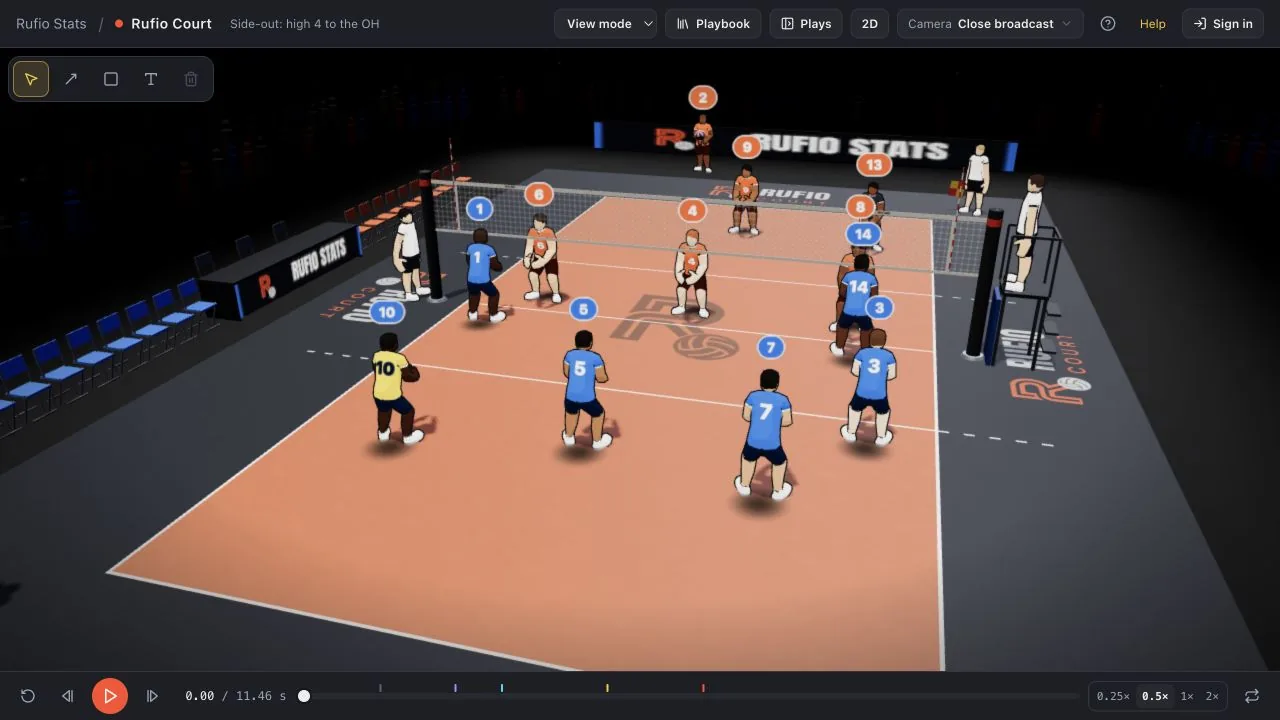
Control the replay
- Press Play below the court. The button becomes Pause while the play runs.
- Choose 0.5× or 0.25× for a slower replay. 1× restores normal speed.
- Drag the timeline to a moment you want to discuss. Restart returns to the beginning.
- Turn on Loop if you want the play to repeat.
Choose what to show
In 3D, drag the court to look around. The Camera menu has fixed views and views through a player. Use 2D for an overhead court; the same button returns to 3D.
View mode also has temporary arrows, zones and labels. They are coaching marks for this view. Switch to Edit mode to add annotations that belong to a saved play.
When a drill stops
A drill normally plays its lead-in and one round, then stops. This is the demonstration, not the total practice time. Read the drill card for suggested reps and rest. Turn on Loop to repeat the shown round.
Related guides
Getting started with Rufio Court
Watch your first volleyball play, try an edit and keep a copy. You can start without signing in.
Quick Plays and formations
Choose a complete volleyball play or start from a formation and add your own touches.
Camera views and First person
Show a court angle, follow programmed camera moves or see a rally through a player’s eyes.